
n8n Workflows
Food Menu Update Notifier via WhatsApp, Email & Twilio SMS
What Is It?
This automation system keeps customers informed about the restaurant’s latest menu updates without any manual effort.
Using n8n, Google Sheets and multi-channel communication APIs, it automatically detects changes in the restaurant’s Special Menu Sheet and sends customized alerts to customers via WhatsApp, Email, or SMS (Twilio).
It ensures that every customer receives real-time updates on new dishes, offers, or special items - personalized to their communication preference.
Key Benefits
1. Automated Menu Monitoring
Continuously checks the restaurant’s Google Sheet for new or updated items and triggers alerts instantly.
2. Personalized Notifications
Each customer receives updates through their preferred platform - WhatsApp, Email, or SMS.
3. Multi-Channel Communication
Supports WhatsApp API, Twilio SMS and Email (Gmail/SMTP) for full outreach coverage.
4. Error-Free and Consistent Updates
Removes human dependency by automatically formatting, sending and logging every message.
5. Centralized Logging and Analytics
Every notification status (sent/delivered/failed) is logged into Google Sheets for reporting and audit.
Our n8n Workflow Overview
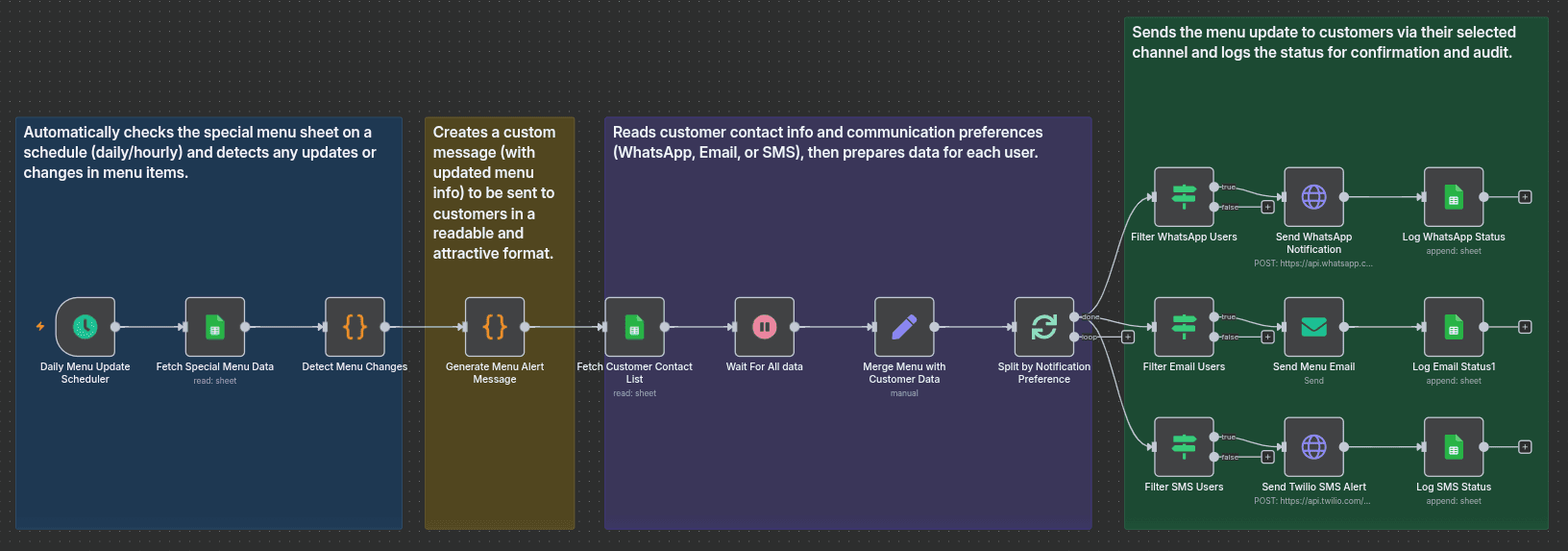
Workflow 1: Detect Menu Changes
1. Trigger: Daily Menu Update Scheduler
A scheduled trigger runs hourly or daily to check the restaurant’s Google Sheet for menu updates.
2. Fetch Special Menu Data
Retrieves the latest data from the menu sheet (e.g., new dishes, price changes, special offers).
3. Detect Menu Changes (Code Node)
Compares the current data with the previous snapshot to identify additions or modifications.
4. Generate Menu Alert Message
Formats the detected changes into a readable and attractive message for customer distribution.
Workflow 2: Notify Customers
1. Fetch Customer Contact List
Reads customer details and their notification preferences (WhatsApp, Email, SMS) from Google Sheets.
2. Merge Menu with Customer Data
Combines updated menu messages with each customer’s contact and communication preference.
3. Split by Notification Preference
Categorizes customers into three branches - WhatsApp, Email and SMS.
4. Send Notifications
WhatsApp Users: Sends menu updates through the WhatsApp Business API.
Email Users: Sends formatted email updates to subscribers.
SMS Users: Sends quick alerts using Twilio API.
Log Status
Records every message delivery status into Google Sheets for audit and confirmation.
Tools & Integrations
Data Source
Google Sheets: Maintains the restaurant’s special menu and customer contact list.
Automation
n8n: Manages data fetching, comparison logic and multi-channel message distribution.
Code Nodes: Detect and format menu updates dynamically for message templates.
Communication APIs
WhatsApp API: Sends interactive menu updates.
Email (SMTP / Gmail): Delivers detailed menu alerts.
Twilio SMS: Sends short menu alerts for quick notifications.
Logging & Reporting
Google Sheets: Tracks message delivery and system logs for analytics.
AI Models Behind the System
- Schedule Trigger: Runs automatically at defined intervals.
- Data Comparison: Identifies menu changes using logic nodes.
- Message Formatting: Converts updates into user-friendly messages.
- Preference Matching: Determines the correct communication channel.
- Notification Dispatch: Sends alerts via WhatsApp, Email, or SMS.
- Logging & Confirmation: Appends delivery data to Google Sheets for review.
Why Choose OneClick IT Consultancy?
- Experts in Restaurant Automation: Proven workflows for digital hospitality operations.
- Multi-Channel Communication Design: Covers all major customer messaging platforms.
- Fully No-Code Solution: Built entirely with n8n for easy maintenance and scalability.
- Customizable Message Templates: Adaptable formats for daily specials, discounts, or new arrivals.
- Data Security & Reliability: All customer data stored securely within Google Sheets and APIs.
Real World Example Use Case
A restaurant implemented this system to automatically send daily updates about special dishes. Each morning, the workflow:
Checks the Special Menu Sheet for updates.
Detects new items or offers.
Sends the update to 500+ customers across WhatsApp, Email and SMS.
Logs every message’s status for verification.
This automation increased customer engagement by 75%, reduced manual messaging time by 95% and ensured every customer stayed informed about menu changes in real time.
Conclusion: Transform Your Travel Agency with AI WhatsApp Automation
The Food Menu Update Notifier is an intelligent automation solution that bridges your restaurant’s kitchen updates with your customers’ devices - instantly and accurately.
By combining Google Sheets, n8n and multi-channel messaging APIs, it ensures every customer knows what’s new on the menu - without lifting a finger. Visit Official Workflow
Ready to automate your restaurant’s menu updates? Contact Oneclick's AI Automation Team to schedule a free consultation.


n8n Workflow
Contact Us